Introduction
Technology has transformed the way businesses operate, communicate, store information, and deliver services. One of the most important technologies behind this transformation is cloud computing.
From storing photos and documents online to running business applications, hosting websites, analyzing large amounts of data, and supporting artificial intelligence applications, cloud computing has become an important part of modern digital infrastructure.
But what exactly is cloud computing?
In simple terms, cloud computing means using computing resources such as servers, storage, databases, software, networking, and processing power over the internet instead of relying entirely on physical infrastructure located on your own computer or office premises.
For businesses, cloud computing can provide flexibility, scalability, accessibility, and cost efficiency. For students and professionals, understanding cloud technology can open doors to careers in areas such as cloud engineering, DevOps, cybersecurity, software development, data engineering, and IT infrastructure.
Whether you are a business owner, student, entrepreneur, IT professional, or someone simply trying to understand modern technology, learning the fundamentals of cloud computing is increasingly valuable.
In this comprehensive guide, we will explain what cloud computing is, how it works, its major types, service models, benefits, challenges, applications, security considerations, career opportunities, and future trends.
What Is Cloud Computing?
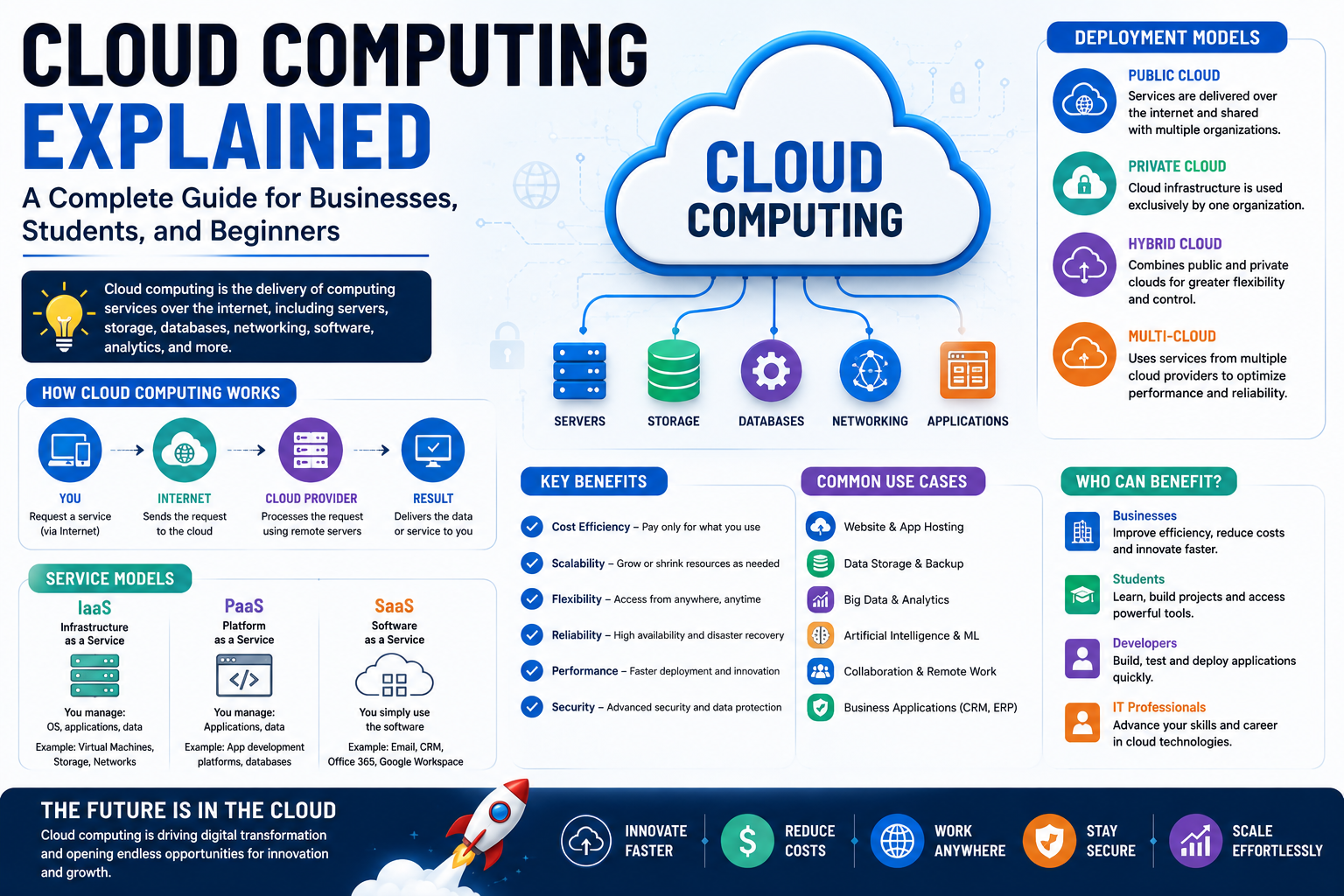
Cloud computing is the delivery of computing resources and technology services through the internet.
Instead of purchasing and maintaining all the physical hardware required to run an application or store information, an organization can access computing resources from a cloud provider.
These resources can include:
Servers
Storage
Databases
Networking
Software
Processing power
Security services
Development platforms
Analytics tools
Artificial intelligence infrastructure
For example, when a business stores files in an online storage platform instead of keeping everything on a local computer, it is using cloud-based storage.
Similarly, when a company hosts its website on remote servers that it accesses through the internet, it is using cloud infrastructure.
The "cloud" is therefore not a mysterious location. It refers to a network of remote computing resources that users can access through the internet.
How Does Cloud Computing Work?
To understand cloud computing, imagine a traditional business IT setup.
A company might purchase:
Physical servers
Hard drives
Networking equipment
Backup systems
Security hardware
Data center infrastructure
The company would then need employees or IT professionals to maintain this equipment.
With cloud computing, many of these resources can be accessed from a cloud service provider.
The provider maintains the underlying infrastructure while customers use the computing resources according to their requirements.
A simplified cloud computing process looks like this:
User → Internet → Cloud Platform → Computing Resources → Application/Data
For example, when an employee accesses a cloud-based business application:
The employee connects to the internet.
The request reaches the cloud platform.
The cloud infrastructure processes the request.
The required data or application is accessed.
The result is delivered back to the user.
The underlying infrastructure can involve data centers, servers, networking systems, storage devices, virtualization technologies, and software.
Why Is Cloud Computing Important?
Cloud computing has changed the traditional approach to IT infrastructure.
Previously, businesses often had to make large investments in physical infrastructure before launching applications or expanding their operations.
Cloud computing allows organizations to obtain resources more flexibly.
For example, a startup may begin with limited computing requirements. As its customer base grows, it can increase its cloud resources.
This flexibility is particularly useful for businesses experiencing rapid growth or unpredictable demand.
Cloud computing also supports remote work, digital transformation, software development, data analytics, artificial intelligence, and many other modern technologies.
Key Features of Cloud Computing
Cloud computing has several characteristics that distinguish it from traditional IT infrastructure.
1. On-Demand Resources
Organizations can access computing resources when they need them.
Instead of purchasing physical servers in advance, businesses can provision resources according to their requirements.
2. Scalability
Cloud resources can often be increased or decreased based on demand.
For example, an e-commerce website may experience significantly higher traffic during a major sale. Cloud infrastructure can help the business handle changing workloads.
3. Internet-Based Access
Cloud services can generally be accessed through internet-connected devices, depending on the specific service and configuration.
This makes remote collaboration and distributed work easier.
4. Resource Sharing
Cloud providers operate large-scale infrastructure that can serve multiple customers while maintaining logical separation between environments.
This allows providers to achieve economies of scale.
5. Pay-as-You-Use Models
Many cloud services follow usage-based pricing.
Instead of purchasing infrastructure upfront, customers may pay according to resources consumed, subscription plans, or other pricing models.
This can make advanced infrastructure more accessible to smaller businesses.
Types of Cloud Computing
Cloud computing can be categorized in different ways. One common approach is based on how the cloud infrastructure is deployed.
The major deployment models are:
Public Cloud
Private Cloud
Hybrid Cloud
Multi-Cloud
Let's understand each one.
1. Public Cloud
A public cloud provides computing resources through a cloud provider's infrastructure.
Organizations and individuals can use services such as:
Computing
Storage
Databases
Networking
Analytics
Application hosting
Public cloud environments are commonly used because they can offer flexibility and scalability without requiring organizations to build their own large-scale data centers.
Public cloud is often suitable for:
Startups
Small businesses
Web applications
Software development
Testing environments
Digital services
2. Private Cloud
A private cloud is designed for the dedicated use of a single organization.
It can provide greater control over infrastructure and configuration.
Private cloud environments may be useful for organizations with specific:
Security requirements
Compliance needs
Performance requirements
Data management policies
Private cloud infrastructure can be operated by the organization itself or managed by a third-party provider.
3. Hybrid Cloud
Hybrid cloud combines private and public cloud environments.
An organization might keep certain sensitive workloads in a private environment while using public cloud resources for other applications.
For example, a company could maintain sensitive internal systems within a controlled environment while using public cloud infrastructure for scalable web applications.
Hybrid cloud can provide flexibility, but it can also introduce additional management and integration complexity.
4. Multi-Cloud
Multi-cloud means using services from more than one cloud provider.
Organizations may choose a multi-cloud approach to:
Avoid excessive dependence on one provider
Use specialized services
Improve resilience
Meet geographic requirements
Optimize workloads
However, managing multiple cloud environments can require additional skills, tools, and governance.
Cloud Computing Service Models
Another important way to understand cloud computing is through its service models.
The three traditional service models are:
Infrastructure as a Service (IaaS)
Platform as a Service (PaaS)
Software as a Service (SaaS)
1. Infrastructure as a Service (IaaS)
IaaS provides fundamental computing infrastructure through the cloud.
This can include:
Virtual machines
Storage
Networking
Computing resources
Instead of purchasing physical servers, businesses can rent or provision virtual infrastructure.
IaaS provides considerable flexibility but generally requires users to manage more of the operating environment.
Example Uses
IaaS can be used for:
Website hosting
Application hosting
Development environments
Data processing
Backup infrastructure
2. Platform as a Service (PaaS)
PaaS provides developers with a platform for building, testing, deploying, and managing applications.
The provider manages much of the underlying infrastructure, allowing developers to focus more on application development.
PaaS can simplify:
Application deployment
Development environments
Database integration
Application scaling
Testing
It is particularly useful for software development teams.
3. Software as a Service (SaaS)
SaaS provides complete software applications through the internet.
Users typically access the application through a web browser or dedicated application.
Examples of SaaS categories include:
Email
CRM
Accounting
Project management
Collaboration
Marketing
Human resources
SaaS is one of the most familiar forms of cloud computing because people use cloud-based software every day.
Cloud Computing vs Traditional IT Infrastructure
Traditional IT infrastructure often requires businesses to purchase and maintain physical equipment.
Cloud computing shifts much of that infrastructure responsibility to cloud providers.
| Traditional IT | Cloud Computing |
|---|---|
| Physical infrastructure | Cloud-based infrastructure |
| Large upfront investment | Flexible pricing models |
| Limited scalability | Scalable resources |
| On-site maintenance | Provider-managed infrastructure in many service models |
| Hardware upgrades required | Resources can often be provisioned digitally |
| Expansion can take time | Resources can often be added quickly |
| Significant infrastructure management | Shared responsibility model |
Cloud computing does not eliminate infrastructure management completely. Instead, the responsibilities are distributed differently depending on the service model.
Benefits of Cloud Computing
Cloud computing offers several potential advantages to businesses and organizations.
1. Cost Efficiency
Cloud computing can reduce the need for significant upfront hardware investments.
Businesses can access computing resources without building an entire physical infrastructure themselves.
However, cloud computing is not automatically cheaper. Poor resource management can lead to unnecessary cloud spending.
Therefore, businesses should monitor usage and optimize their cloud environments.
2. Scalability
Scalability is one of the biggest advantages of cloud technology.
Businesses can adjust resources according to demand.
This is particularly useful for:
E-commerce platforms
Streaming services
Online education
SaaS businesses
Seasonal businesses
High-traffic websites
3. Flexibility
Cloud services allow businesses to adapt their technology infrastructure as their requirements change.
A startup can begin with a small environment and expand as the business grows.
4. Remote Accessibility
Cloud-based applications and data can support employees working from different locations.
This can improve collaboration between:
Office teams
Remote employees
Freelancers
Consultants
Branch offices
International teams
5. Faster Deployment
Cloud platforms can allow businesses to provision computing resources much faster than purchasing and installing physical infrastructure.
This can accelerate software development and product launches.
6. Backup and Disaster Recovery
Cloud infrastructure can support backup and disaster recovery strategies.
Organizations can maintain copies of important information and develop recovery plans for situations such as:
Hardware failure
Accidental deletion
Cyber incidents
Natural disasters
System outages
A proper disaster recovery strategy should include more than simply storing data in the cloud.
7. Access to Advanced Technology
Cloud platforms can provide businesses with access to advanced capabilities such as:
Machine learning
Artificial intelligence
Big data analytics
High-performance computing
Advanced databases
Automation
This can help smaller organizations access technologies that would otherwise require significant infrastructure investment.
8. Improved Collaboration
Cloud-based collaboration tools allow multiple users to work with shared information and applications.
This can improve coordination and reduce dependence on locally stored documents.
Common Uses of Cloud Computing
Cloud computing is used across almost every industry.
Website Hosting
Businesses can host websites and web applications using cloud infrastructure.
Data Storage
Organizations can store and access files, documents, backups, and other data.
Software Development
Developers can use cloud environments for coding, testing, deployment, and application monitoring.
Business Applications
Organizations can access cloud-based CRM, accounting, HR, ERP, and collaboration applications.
Data Analytics
Businesses can process and analyze large volumes of data.
Artificial Intelligence
Cloud platforms provide computing resources for AI and machine learning workloads.
Online Education
Educational institutions can use cloud technology to support learning management systems, online classes, digital resources, and collaboration.
E-Commerce
Online businesses can use cloud infrastructure to host websites, manage databases, process workloads, and scale during periods of high demand.
Cloud Computing for Businesses
Cloud computing can be particularly valuable for businesses undergoing digital transformation.
A business can use cloud technology for:
Website hosting
Email
File storage
CRM
Accounting
HR management
Business analytics
Application development
Cybersecurity
Data backup
For startups, cloud technology can reduce the need to purchase large amounts of physical infrastructure at the beginning.
For established companies, cloud migration can provide opportunities to modernize legacy systems and improve operational flexibility.
Cloud Computing for Startups
Startups often operate under tight budgets and need to scale quickly.
Cloud computing can provide several advantages.
Lower Infrastructure Requirements
Startups can access computing resources without building a large physical data center.
Faster Experimentation
Developers can quickly create environments for testing new applications.
Scalability
Resources can grow with customer demand.
Global Accessibility
Cloud infrastructure can support services used by customers across different regions.
Access to Advanced Services
Startups can access databases, analytics, AI, and other technologies without developing all infrastructure internally.
Cloud Computing and Cybersecurity
Cloud security is a major consideration for organizations moving their workloads to the cloud.
It is important to understand that cloud providers and customers often share security responsibilities.
The provider may be responsible for securing parts of the underlying infrastructure, while customers may be responsible for:
User access
Passwords
Permissions
Application security
Data configuration
Network settings
Security policies
The exact responsibilities depend on the cloud service model and provider.
Businesses should implement practices such as:
Multi-factor authentication
Strong identity management
Least-privilege access
Encryption
Regular backups
Security monitoring
Employee training
Vulnerability management
Cloud security should be planned from the beginning rather than added later.
Challenges of Cloud Computing
Although cloud computing provides many benefits, it also has challenges.
1. Internet Dependency
Many cloud services require reliable internet connectivity.
Connectivity problems can affect access to applications and data.
2. Security Risks
Misconfigured cloud resources can expose data or systems.
Businesses need proper security controls and trained professionals.
3. Cost Management
Usage-based pricing can become expensive if resources are poorly managed.
Organizations should monitor:
Resource utilization
Storage
Network usage
Idle infrastructure
Application costs
4. Vendor Lock-In
Organizations that become heavily dependent on one cloud provider may find migration difficult.
Businesses should evaluate portability and exit strategies when designing cloud architectures.
5. Skills Gap
Cloud environments require specialized knowledge.
Organizations may need professionals with expertise in:
Cloud architecture
DevOps
Cybersecurity
Networking
Automation
Infrastructure management
This has created significant demand for cloud-related skills.
What Is Cloud Migration?
Cloud migration is the process of moving applications, data, systems, or workloads from existing infrastructure to a cloud environment.
Businesses may migrate:
Databases
Applications
Websites
File storage
Business systems
Cloud migration should be carefully planned.
A typical migration process may include:
Assessment → Planning → Architecture → Migration → Testing → Deployment → Monitoring → Optimization
Businesses should evaluate applications, dependencies, security requirements, performance, and costs before migration.
Cloud Computing and DevOps
Cloud computing and DevOps are closely connected.
DevOps combines development and operations practices to improve software delivery and collaboration.
Cloud environments can support DevOps through:
Automated deployment
Infrastructure as code
Continuous integration
Continuous delivery
Monitoring
Scalable environments
Together, cloud computing and DevOps can help organizations release software faster and manage infrastructure more efficiently.
Cloud Computing and Artificial Intelligence
Artificial intelligence requires substantial computing resources, especially for training and running sophisticated models.
Cloud platforms can provide access to:
High-performance computing
GPUs and specialized processors
Machine learning platforms
Data storage
AI development environments
This allows businesses to experiment with AI without necessarily building their own specialized infrastructure.
As AI adoption grows, cloud computing is expected to remain an important part of AI infrastructure.
Cloud Computing Careers
Cloud computing has created a wide range of career opportunities for students and IT professionals.
Popular roles include:
Cloud Engineer
Cloud engineers design, deploy, and manage cloud infrastructure.
Cloud Architect
Cloud architects design cloud environments based on business and technical requirements.
DevOps Engineer
DevOps professionals automate development and infrastructure processes.
Cloud Security Engineer
These professionals focus on protecting cloud infrastructure and applications.
Cloud Developer
Cloud developers build applications designed to operate in cloud environments.
Site Reliability Engineer
SRE professionals focus on reliability, availability, performance, and automation.
Cloud Consultant
Cloud consultants help organizations plan and implement cloud strategies.
Skills Required for a Career in Cloud Computing
Students interested in cloud careers should build a strong foundation in:
Computer networking
Operating systems
Linux
Programming
Databases
Virtualization
Cloud platforms
DevOps
Cybersecurity
Automation
Containers
Practical experience is particularly valuable.
Students can work on projects such as:
Hosting a website in the cloud
Creating a cloud database
Building a simple cloud application
Automating deployment
Setting up monitoring
Creating a secure cloud environment
How Businesses Can Start Their Cloud Journey
Businesses should not migrate to the cloud simply because it is a popular technology.
They should begin by identifying their objectives.
Step 1: Assess Existing Infrastructure
Understand current applications, servers, databases, and processes.
Step 2: Identify Business Goals
Determine whether the primary goal is:
Cost optimization
Scalability
Modernization
Remote access
Performance
Business continuity
Step 3: Select an Appropriate Cloud Model
Choose between public, private, hybrid, or multi-cloud based on requirements.
Step 4: Develop a Security Strategy
Define access controls, authentication, encryption, monitoring, and backup policies.
Step 5: Start With a Pilot
Test the approach with a manageable workload before migrating critical systems.
Step 6: Monitor and Optimize
Track performance, security, and costs continuously.
The Future of Cloud Computing
Cloud computing continues to evolve alongside other emerging technologies.
Some important trends include:
Artificial Intelligence and Machine Learning
Cloud platforms are increasingly becoming important infrastructure for AI workloads.
Edge Computing
Edge computing processes information closer to where data is generated, which can reduce latency for certain applications.
Serverless Computing
Serverless models allow developers to run application code without managing traditional servers directly.
Cloud-Native Development
Organizations are increasingly building applications specifically for cloud environments.
Increased Cloud Security
As cloud adoption grows, security, identity management, compliance, and data protection will become even more important.
Hybrid and Multi-Cloud Strategies
Organizations may increasingly combine multiple environments based on workload requirements.
Frequently Asked Questions About Cloud Computing
What is cloud computing in simple words?
Cloud computing means using computing resources such as storage, servers, software, and databases through the internet instead of relying entirely on local physical infrastructure.
What are the main types of cloud computing?
The major deployment models are public cloud, private cloud, hybrid cloud, and multi-cloud.
What are the three main cloud service models?
The three traditional service models are Infrastructure as a Service (IaaS), Platform as a Service (PaaS), and Software as a Service (SaaS).
Is cloud computing useful for small businesses?
Yes. Cloud computing can provide small businesses with scalable infrastructure and software without requiring them to build and maintain extensive physical IT infrastructure.
Is cloud computing secure?
Cloud computing can be secure when properly designed and managed. Security is a shared responsibility between cloud providers and customers, depending on the service being used.
Is cloud computing a good career option?
Cloud computing offers career opportunities in cloud engineering, architecture, DevOps, cloud security, development, consulting, and site reliability engineering.
What is the difference between cloud computing and cloud storage?
Cloud storage is specifically focused on storing data remotely. Cloud computing is broader and includes computing power, applications, databases, networking, storage, and other services.
Conclusion
Cloud computing has become one of the most important technologies shaping the modern digital world. It has changed how businesses build applications, store information, manage infrastructure, collaborate with employees, and deliver digital services.
At its core, cloud computing provides access to computing resources through the internet, allowing organizations to use technology in more flexible and scalable ways.
From startups and small businesses to large enterprises, cloud technology can support everything from website hosting and file storage to software development, data analytics, cybersecurity, artificial intelligence, and business applications.
However, adopting cloud computing successfully requires more than simply moving systems online. Organizations need to consider security, costs, performance, compliance, architecture, employee skills, and long-term business objectives.
For students and professionals, cloud computing also represents a growing field of career opportunities. Developing skills in cloud platforms, networking, Linux, programming, DevOps, automation, and cybersecurity can create a strong foundation for a career in modern IT.
As businesses continue embracing digital transformation, cloud computing will remain a fundamental part of the technology landscape. Combined with artificial intelligence, automation, DevOps, cybersecurity, and data analytics, cloud technology will continue enabling organizations to innovate faster and operate more efficiently.
The most important lesson is simple:
Cloud computing is not just about storing data online—it is about creating a flexible digital foundation that helps people and businesses build, operate, scale, and innovate.
For businesses planning their digital future, understanding cloud computing today can be an important step toward building a more agile, secure, and technology-driven organization